Thanks for taking a picture of me Jana! You are amazing!

Followers

WHO IS BALD IS BEAUTIFUL PHOTOGRAPHY?

Well, it's me of course! Hi, I'm Scott, just an ordinary guy who loves life and all the little nuances that it brings! Simply put, I'm a father to a wonderful son, a husband to a beautiful wife, and an amateur photographer who enjoys looking at the world through a piece of glass! I took up photography a couple of years ago, after having gastric bypass surgery. Since 12/07, I have lost 180 pounds, but found a real passion for documenting life with my camera. I could say that the big names out there have inspired me, and they have, But my true inspiration comes from the people I meet everyday who share the same thoughts and zeal I have for photography. We are truly blessed with some really great photographers around Nashville. So, what are you waiting for.... ...grab a camera, snap some pics, and enjoy life to the fullest!
*

Monday, March 15, 2010

Sarah Ji Presets

I love my Lightroom Presets.  They are probably the easiest and fastest way to customize and edit a photo.  These presets are from Sarah Ji.  This one is called “Autumn”, but she has several more that you can download and install for free.  The internet is full of these little goodies, you just have to search for them.  Also check out my Lightroom Stuff over on the left for some further LR good-i-ness!  Is good-i-ness a word?
To install a preset, just do the following:
1) Unzip the preset zip file on to your desktop
2) Go to the Develop module. NOTE: YOU MUST BE THE DEVELOP MODULE
3) Go to the Presets panel on the left. Right click anywhere in it and choose Import.
4) Select the .lrtemplate files you unzipped in Step 1 and click Import NOTE: DO NOT IMPORT THE ZIP FILE


Very easy to do, but if you need help, give me a shout!


Sara J Presets
An example of what these presets look like in action! The presets above are straight from LR.  I usually tweak a few things before I post a pic, but these a great starting points!


Enjoy!


3250121936_ba967ff09a_o

Sunday, March 14, 2010

Fix It Friday…On A Sunday!

Well, it’s my favorite time of the week. No, not the end of the weekend, but Fix It Friday from I ♥ Faces! This weeks fix comes from Amy Pinney over at Amy Pinney Photography. When I first saw this photo, I thought it would be pretty hard to fix, but I was wrong. This one was pretty easy to take care of.


3-12-10


This was the original photo from Amy. It is kind of dark, and full of noise. After I imported the photo into Lightroom, I did an auto fix on the exposure, added some fill light, and then went to custom white balance. At this point I cropped the photo to remove the lower left corner that was really dark.


One of my favorite programs to use on any photo is Color Efex Pro 3.0. I love several of the filters that are there, but on this one I used the darken/lighten center filter. It allows you to add light to any portion of the photo that you need. When I felt OK with my results, I went back to Lightroom and used an adjustment brush on the eyes, just to add a little brightness to them.


From here I went to Photoshop CS4 and added a few textures. I feel good about my finished product.


3-12 final


On this edit, I took the finished product and ran it through Topaz Adjust 4. If you are a NAPP member, you can get Topaz Adjust for just $35. Not bad for an editing program like this!


Fix It Friday 3-12


Well, that’s it for today. Make sure you head over to I ♥ Faces, and check out the other Fix It Friday edits.


3250121936_ba967ff09a_o

Old Hickory Lake Sunrise

Old Hickory Lake Sunrise-31-Edit Old Hickory Lake Sunrise-94-Edit-EditOld Hickory Lake Sunrise-77-Edit-Edit Old Hickory Lake Sunrise-96-Edit-Edit-Edit Old Hickory Lake Sunrise-32-Edit-2Old Hickory Lake Sunrise-27-Edit

Sunday, March 7, 2010

WHAT THE DUCK

Thanks Aaron for reminding me what I need to do to take better photos!

"What The Duck" ) ← click over there

3250121936_ba967ff09a_o

WHAT THE DUCK

Thanks Aaron for reminding me what I need to do to take better photos!

"What The Duck" ) ← click over there

3250121936_ba967ff09a_o

Saturday, March 6, 2010

FIX IT FRIDAY – LOVING MY LIFE

Fix-it_lg

It’s time for another Fix It Friday from I ♥ Faces, the site I ♥ to surf.  Basically it’s pretty cool to hang out with a bunch of talented women and a few guys.  At least I’m safe and sound at home, and of course my wife knows where to find me!  :}
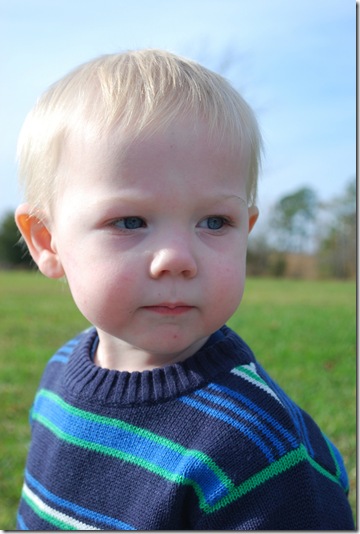
3-5-10

Here is the original photo from Sarah Halstead over at Loving My Life.  Her little guy Dustyn is definitely a keeper!  Click on over and check out her blog, as well as enter her giveaway for a really cool camera strap!

  Fix It Friday 3-5-2

I think I’ve figured out a workflow that I feel pretty comfortable with.  I start out by importing into Lightroom 2 and make some minor adjustments such as exposure, clarity, and vibrancy.  On this photo I tried to use the graduated filter to take care of the underexposed area.  That did not work.  From there I tried to correct the same are with the adjustment brush, once again, no go!  Finally I added a little fill light, and walla, just what I was going for!

I then shipped the photo over to Photoshop and used the patch tool and spot healing brush to take care of a few blemishes.  I’m a big fan of Jessica Sprague, so I used some of her techniques to make the eyes pop.  On the photo above, I ran a Coffeeshop Action called Sun Kissed.  Click over to Rita’s site for some unbelievable freebies and tutorials.  She rocks and always has a pot of coffee brewing when I’m there!  OK, I have to supply my own coffee, but I still like to hang and visit at the  Coffee Shop!

 Fix It Friday 3-5 

On the photo above I applied a a couple of hue saturation layers to create a sepis toned photo.  Once again, Jessica Sprague to the rescue!

 Fix It Friday 3-5-3

This last one I sent back to Lightroom and used a Sarah Jane preset called Tropical Sea!

Fix It Friday 3-5-10 BIB

And finally, I just loved using some textures and photo frames from Shadow House Creations!  Another really cool site for freebies and techniques!

Well, that’s it for this week.  I’m off to the lake to try to get some snaps of sunrise!  Finally a week without snow!

3250121936_ba967ff09a_o

Sunday, February 28, 2010

Saturday, in the park, You think it was the 4th of July…

…except it wasn’t warm enough to be the 4th of July!

I met up with some really cool people yesterday at Shelby Park in East Nashville.  I truly love Shelby, it’s close to home and easily accessible!  The group that met yesterday was part of the Nashville Meet-up Photography Group.  This was not an official meet-up, but more of an impromptu gathering, put together by my friend Donna.

It was cold, but not unbearable.  Anyway, here are a few of my shots from the outing!

Shelby Park Meet Up 2-27-6   Shelby Park Meet Up 2-27-2

Shelby Park Meet Up 2-27-10   Shelby Park Meet Up 2-27-4

 Shelby Park Meet Up 2-27-8     Shelby Park Meet Up 2-27-16

Shelby Park Meet Up 2-27-12Shelby Park Meet Up 2-27-14

Shelby Park Meet Up 2-27-18

By this time things were starting to run together and looking kind of dreamy.  So I headed home and had another cup of coffee!

Here are the links to the meet-up groups sites.  If you are interested in going to any, give me a shout, I would love to “meet-up” with ya!


Nashville Meet-up Photography Group

Nashville Photography Meet-up Face Book Fan Page

Have a great day!

3250121936_ba967ff09a_o